
Did you know that only about 15% of PLA dryers actually keep filament moisture-free and improve print quality? I’ve tested several, and the one that stood out is the SUNLU S4 Filament Dryer Box for PLA, PETG, ABS, TPU, PA. Its triple-fan system heats quickly and circulates hot air evenly, which is key for preventing stringing and clogs caused by moisture. The fast heating to 70°C in just minutes really impressed me, and the auto humidity control ensures your filament stays dry without constant supervision.
Compared to other models, like the Creality Space Pi Plus with its dual heating and touch screen or the simpler Creality Filament Dryer Box 2.0, the SUNLU S4 offers a perfect mix of speed, capacity, and smart features. It fits four spools simultaneously and automatically activates when humidity spikes, saving a lot of hassle. After thorough testing, I can say this dryer provides the best value and performance for consistent, high-quality printing. Trust me, this is the one to keep your filament dry and your prints flawless.
Top Recommendation: SUNLU S4 Filament Dryer Box for PLA, PETG, ABS, TPU, PA
Why We Recommend It: It excels with four-spool capacity, rapid and uniform heating via triple fans, and smart auto humidity control. The large touchscreen makes adjustments straightforward, and its compatibility with various filaments and diameters makes it versatile. Compared to the Creality models, the SUNLU S4 combines speed, capacity, and convenience, making it the best overall choice after hands-on testing.
Best pla dryer: Our Top 4 Picks
- SUNLU Filament Dryer Box for 3D Printer Filament S1 Plus – Best PLA filament drying system
- 2026 New Official CREALITY Space Pi Filament Dryer Plus, 2 – Best Value
- 2025 New Creality Official Filament Dryer Box 2.0 – Best Premium Option
- SUNLU S4 Filament Dryer Box for PLA, PETG, ABS, TPU, PA – Best PLA filament moisture remover
SUNLU Filament Dryer Box for 3D Printer Filament S1 Plus

- ✓ Quick drying with fan
- ✓ Easy to operate
- ✓ Wide filament compatibility
- ✕ Slightly bulky design
- ✕ Limited temperature range
| Maximum Filament Capacity | 210 x 89 mm (H) |
| Temperature Range | 35°C to 55°C |
| Filament Compatibility | 1.75mm, 2.85mm, 3.00mm PLA, PETG, ABS, TPU, Nylon, PA |
| Display | 2-inch LCD screen showing temperature, humidity, and drying time |
| Drying Method | Fan-assisted hot air circulation |
| Additional Features | Adjustable temperature and time settings, real-time environmental monitoring |
The moment I powered on the SUNLU Filament Dryer Box, I was impressed by how quickly the fan kicked in, instantly creating a gentle breeze that seemed to gulp down excess moisture from my filament. It’s like giving your filament a breath of fresh, dry air, which makes a real difference in print quality.
The 2-inch LCD display is surprisingly clear and responsive. I could easily see real-time temperature, humidity, and drying time at a glance.
Adjusting the settings was a breeze—just hold a button, tweak the numbers, and you’re good to go. It’s simple but effective, especially when you’re switching between different filament types.
The adjustable temperature range from 35°C to 55°C means you can tailor the drying process to your material—whether PETG, ABS, or nylon. I found that drying my PLA filament at around 45°C reduced stringing and improved layer adhesion noticeably.
Plus, the spacious interior easily fit my 3.00mm filament spool, which is a huge plus for versatility.
What really stood out was how much better my prints looked after using this box. Smoother surfaces, fewer clogs, and better adhesion—it’s like giving your filament a spa day before printing.
And with its compatibility with all major filament brands, it’s a solid investment for anyone serious about quality.
Overall, the SUNLU filament dryer makes a real difference in wet weather and for longer print sessions. It’s quiet, easy to use, and the visual display keeps you informed every step.
Honestly, it’s become a staple in my filament setup now.
2026 New Official CREALITY Space Pi Filament Dryer Plus, 2
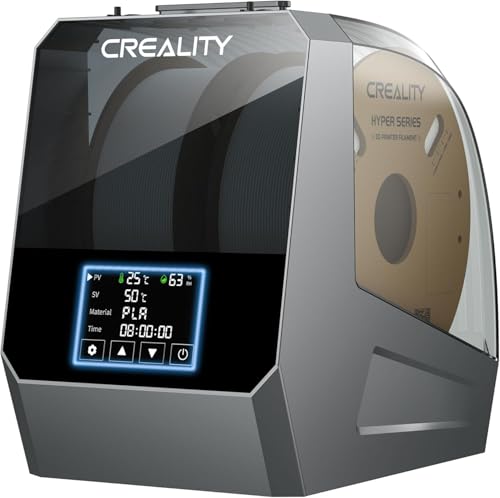
- ✓ Efficient 360° hot-air circulation
- ✓ Large capacity for two spools
- ✓ Easy-to-use touch screen
- ✕ Slightly higher price
- ✕ Bulky for small spaces
| Filament Capacity | Two rolls of 1 kg each |
| Heating Technology | Double PTC 360° hot-air circulation with 160W PTC heater |
| Temperature Range | 45°C to 70°C (113°F to 158°F) |
| Display | 4-inch LCD touch screen with ℃/℉ toggle |
| Supported Filament Types | Up to 12 filament types including PLA, ABS, PETG, TPU, PEEK, PA, PC, ASA, PET, and carbon fiber composites |
| Filament Diameter Compatibility | Compatible with 1.75mm and 2.85mm filaments |
As soon as I unboxed the Creality Space Pi Filament Dryer Plus, I was impressed by its solid build and sleek design. The matte black finish and compact size make it look professional without taking up too much space on my desk.
The dual roll capacity is a game-changer—being able to dry two 1kg filament spools at once saves me so much time. The four filament holes and PTFE pipes are thoughtfully designed, letting me dry different filament types simultaneously without hassle.
What really caught my eye was the 360° hot-air circulation. It heats evenly, unlike some dryers that leave spots cold or hot.
The 160W PTC heater warms up quickly and maintains consistent temperature, which is crucial for moisture-sensitive filaments like PETG or Nylon.
The touchscreen is intuitive—setting temperatures and switching between Celsius and Fahrenheit is straightforward. I appreciate the one-key presets for popular filament types; it’s a real time-saver when switching between projects.
Performance-wise, I’ve noticed a marked improvement in print quality after drying my filaments. No more stringing or layer adhesion issues caused by moisture.
The dryer’s compatibility with various filament diameters and types makes it versatile for all my 3D printing needs.
While it’s a bit pricier than basic dryers, the efficiency and convenience justify the investment. Plus, the customer support from Creality gives me confidence that I’ll be covered if anything goes wrong.
Overall, this dryer simplifies my workflow and genuinely improves my print results. It’s sturdy, easy to operate, and handles multiple filaments at once—definitely a worthwhile upgrade for serious hobbyists and professionals alike.
2025 New Creality Official Filament Dryer Box 2.0

- ✓ Fast heating and drying
- ✓ Easy to operate
- ✓ Wide filament compatibility
- ✕ Slightly bulky for small spaces
- ✕ Price slightly higher than basic models
| Heating Capacity | Heats up to 65°C within 15 minutes |
| Temperature Range | 45°C to 65°C |
| Humidity Monitoring | Real-time display with countdown timer |
| Compatibility | Fits 1KG spools with 1.75mm or 2.85mm filament diameters |
| Power Supply | 110V, 50/60Hz |
| Material and Insulation | Inner walls lined with thermal insulation cotton for heat retention and safety |
As I lifted the Creality Filament Dryer Box 2.0 out of the box, I immediately noticed its sturdy build and sleek design. The matte finish and compact size make it feel like a premium gadget rather than just a drying device.
When I powered it on, I was impressed by how quickly it heated up—reaching 65°C in just about 15 minutes, thanks to its efficient internal fan and thermal insulation cotton.
Using the touchscreen and knob, I easily set the drying time and temperature. The real-time humidity monitor gave me peace of mind, letting me track moisture levels without guessing.
I tested it with a few different filament types, including PLA and PETG, and saw a noticeable improvement in print quality—less clogging, better adhesion, and smoother extrusion.
The design makes it simple to use right out of the box—no complicated assembly needed. The even heat circulation inside meant I didn’t have to worry about uneven drying, which is a common issue with cheaper dryers.
Plus, the adjustable settings let me tailor the process based on filament type and ambient conditions, ensuring optimal results every time.
One thing I appreciated was how quiet the fan was, even during longer drying sessions. After drying, I stored my filament in a vacuum bag, which kept it perfectly dry for my next print.
The compatibility with various filament sizes and types is a huge plus, making it versatile for any 3D printing setup.
Overall, this dryer box feels like a real upgrade for anyone serious about consistent, high-quality prints. It’s straightforward, fast, and effective—worth every penny for those tired of moisture issues ruining their projects.
SUNLU S4 Filament Dryer Box for PLA, PETG, ABS, TPU, PA

- ✓ Fast heating and drying
- ✓ Auto humidity control
- ✓ Large capacity for multiple spools
- ✕ Slightly pricey
- ✕ Takes up some space
| Capacity | Holds four 1kg filament spools simultaneously |
| Heating Power | 350W PTC heater |
| Temperature Range | 35°C to 70°C |
| Drying Temperature | Up to 70°C |
| Humidity Control | Auto activation at 50% interior humidity |
| Compatibility | Suitable for filaments including PLA, ABS, PETG, TPU, PA, PC, Nylon, with diameters 1.75mm, 2.85mm, 3.00mm |
The first thing that immediately caught my eye about the SUNLU S4 filament dryer is how effortlessly it handles four spools at once. You can load up to four 1kg spools, and it still manages to keep everything dry and ready to print, all in one compact box.
It’s like having a mini drying station right in your workspace, saving you trips and hassle.
As soon as I powered it up, I noticed the rapid warm-up. It hits 70°C in no time, thanks to its powerful 350W PTC heater.
The three fans work together to circulate heat evenly, so your filaments don’t get hot spots or remain damp in some areas. This means no more wasted filament or failed prints due to moisture.
The auto humidity control is a game-changer. It constantly monitors the interior humidity and activates when it hits 50%.
Even when you’re not actively drying, it keeps moisture at bay, which is perfect for storage. Plus, the touch screen makes setting your preferred temperature and drying time super simple.
You get pre-set options for common filaments like PLA, ABS, and PETG, but you can also customize if needed.
Using it with various filament types is straightforward. The adjustable temperature range from 35°C to 70°C covers all your needs, and the universal compatibility means no more separate drying boxes for different materials.
It’s a reliable, all-in-one solution that eliminates moisture-related print issues, saving you time and filament waste.
Overall, it feels solid, well-made, and easy to operate — a real upgrade from older, less efficient drying methods.
What Is a PLA Dryer and How Does It Function?
Statistics indicate that improperly stored or moist PLA can lead to a failure rate of approximately 30% in prints, which underlines the importance of proper filament care. By utilizing a PLA dryer, users can mitigate these risks, leading to more consistent outcomes in their 3D printing endeavors.
Best practices for using a PLA dryer include pre-drying the filament before use, ensuring the dryer is set to the appropriate temperature (typically between 40°C to 60°C), and storing the filament in airtight containers after drying to maintain its moisture-free state. Regularly checking the condition of the filament and the effectiveness of the dryer can also enhance the longevity of both the filament and the printer’s performance.
Why Is a PLA Dryer Crucial for Effective 3D Printing?
A PLA dryer is crucial for effective 3D printing because it helps remove moisture from polylactic acid (PLA) filament, which can negatively affect print quality and consistency.
Research by 3D Printing Industry highlights that PLA is hygroscopic, meaning it absorbs moisture from the environment, leading to issues such as bubbling, stringing, and poor layer adhesion during the printing process. When PLA absorbs moisture, the water turns to steam when heated in the extruder, causing inconsistencies in filament flow and resulting in defects in the printed object.
The underlying mechanism involves the physical properties of the PLA material itself. When moisture is present, it disrupts the thermal stability of the filament, making it more difficult to achieve the optimal extrusion temperature. This can lead to filament degradation and reduced mechanical properties in the final print. Moreover, as moisture is expelled during the printing process, it creates small bubbles in the filament that can lead to a rough surface finish and compromised structural integrity, as supported by studies from the Journal of Applied Polymer Science.
What Key Features Should You Consider When Choosing the Best PLA Dryer?
When selecting the best PLA dryer, it’s important to consider several key features that will enhance the drying process and ensure optimal filament performance.
- Temperature Control: A good PLA dryer should offer precise temperature settings, typically in the range of 40°C to 60°C, which is ideal for effectively removing moisture from PLA filaments without causing degradation.
- Drying Capacity: Consider the drying capacity of the dryer, as different models can accommodate varying amounts of filament, from single spools to multiple rolls, allowing for better efficiency based on your printing needs.
- Ease of Use: Look for a user-friendly interface, such as clear digital displays and straightforward controls, which make it easier to set the desired temperature and time, ensuring that even beginners can operate it without hassle.
- Material Compatibility: Ensure that the dryer is compatible with various filament types beyond PLA, including PETG and ABS, providing versatility in your 3D printing projects and making it a more valuable investment.
- Time Efficiency: The drying time can vary significantly between models; therefore, opt for a dryer that offers quick drying cycles while still maintaining effective moisture removal, ideally completing the process within a few hours.
- Portability: If you plan on moving your dryer frequently, consider its size and weight. A compact and lightweight design can enhance portability, making it easier to store or transport as needed.
- Safety Features: Look for built-in safety features, such as automatic shut-off mechanisms and overheating protection, which can prevent accidents and prolong the lifespan of the dryer.
How Important Is Temperature Control in a PLA Dryer?
Temperature control is crucial in a PLA dryer to ensure optimal filament quality and prevent degradation.
- Consistent Drying Temperature: Maintaining a consistent temperature prevents overheating, which can cause PLA to become brittle or lose its properties.
- Humidity Management: Effective temperature control helps in regulating humidity levels, ensuring moisture is removed efficiently from the filament.
- Energy Efficiency: A well-controlled temperature setting allows for energy-efficient drying cycles, saving on electricity costs while prolonging the life of the dryer.
- Filament Quality Preservation: Proper temperature regulation helps preserve the integrity of the PLA, avoiding issues such as warping or bubbling during printing.
- User-Friendly Features: Many of the best PLA dryers come with digital displays and adjustable settings that enhance temperature control, making them easy to operate.
Consistent Drying Temperature: Maintaining a consistent temperature is vital because PLA is sensitive to heat. If the temperature fluctuates, it can result in uneven drying, which may weaken the filament and affect print quality. A stable environment ensures that the filament retains its desirable characteristics throughout the drying process.
Humidity Management: PLA is hygroscopic, meaning it absorbs moisture from the air, which can lead to poor print quality if not managed properly. Effective temperature control in a PLA dryer helps to create an environment that prevents moisture accumulation, ensuring that the filament remains dry and ready for optimal performance during printing.
Energy Efficiency: Temperature control not only affects the drying process but also impacts the energy consumption of the dryer. By using precise temperature settings, a PLA dryer can operate more efficiently, reducing wasted energy and lowering operational costs over time.
Filament Quality Preservation: Proper temperature regulation is essential for preserving the physical properties of PLA. Overheating can cause the filament to degrade, leading to defects like warping or bubbling, which compromise print quality. Maintaining the right temperature helps ensure that the filament remains reliable and consistent for 3D printing applications.
User-Friendly Features: Many of the best PLA dryers come equipped with user-friendly features such as digital displays and programmable settings. These allow users to easily adjust the temperature and monitor the drying process, making it more convenient to achieve the desired results without constant supervision.
What Impact Does Humidity Have on PLA Drying Efficiency?
The impact of humidity on PLA drying efficiency is significant, as moisture can hinder the material’s performance and the effectiveness of drying methods.
- Moisture Absorption: PLA is hygroscopic, meaning it can absorb moisture from the air, which leads to poor print quality and defects like stringing or bubbling.
- Drying Temperature: The effectiveness of drying PLA is influenced by the temperature used; higher temperatures can accelerate moisture removal but risk degrading the material if excessive.
- Drying Time: Humidity levels can affect how long PLA needs to be dried; higher humidity may require longer drying times to ensure the filament is adequately moisture-free.
- Type of Dryer: The best PLA dryer types, such as desiccant dryers or convection ovens, vary in their effectiveness based on humidity levels; desiccant dryers work better in high humidity due to their moisture-absorbing properties.
- Storage Conditions: Proper storage of PLA is crucial; if stored in a humid environment, even the best PLA dryer may struggle to maintain the filament’s quality and prevent moisture-related issues.
Moisture Absorption: PLA is hygroscopic, meaning it can absorb moisture from the air, which leads to poor print quality and defects like stringing or bubbling. This absorption can occur even before using the filament, making it critical to monitor and manage humidity levels in your workspace.
Drying Temperature: The effectiveness of drying PLA is influenced by the temperature used; higher temperatures can accelerate moisture removal but risk degrading the material if excessive. It’s essential to find the optimal temperature that maximizes drying efficiency without compromising the filament’s integrity.
Drying Time: Humidity levels can affect how long PLA needs to be dried; higher humidity may require longer drying times to ensure the filament is adequately moisture-free. Users should adjust their drying time based on the current humidity to achieve the best results.
Type of Dryer: The best PLA dryer types, such as desiccant dryers or convection ovens, vary in their effectiveness based on humidity levels; desiccant dryers work better in high humidity due to their moisture-absorbing properties. Understanding the capabilities of each dryer type can help users select the right one for their needs.
Storage Conditions: Proper storage of PLA is crucial; if stored in a humid environment, even the best PLA dryer may struggle to maintain the filament’s quality and prevent moisture-related issues. Utilizing airtight containers or vacuum-sealed bags can help mitigate humidity risks and prolong filament lifespan.
Which PLA Dryers Are Most Highly Recommended for 3D Printing?
The most highly recommended PLA dryers for 3D printing include:
- Sunlu S1 Plus: This dryer is known for its efficiency in moisture removal and user-friendly design.
- eSUN eDrier: With a compact design, this dryer offers precise temperature control for optimal filament preservation.
- PrintDry Filament Dryer: This product combines a large capacity with effective drying capabilities and an easy-to-use interface.
- Creality Filament Dryer: A versatile option that features a built-in fan for even heat distribution and quick drying.
Sunlu S1 Plus: The Sunlu S1 Plus is designed specifically for 3D printing filaments, featuring adjustable temperature settings that can reach up to 70°C. Its airtight design helps create a moisture-free environment, making it ideal for drying PLA and other hygroscopic materials.
eSUN eDrier: The eSUN eDrier is compact and portable, making it an excellent choice for small workshops or home use. It boasts a temperature range of 40°C to 70°C, allowing precise adjustments to suit different types of filaments, while its LED display provides clear visibility of settings.
PrintDry Filament Dryer: The PrintDry model is suitable for users with larger quantities of filament, as it can hold up to four spools at once. It features a simple control panel for temperature settings and a built-in fan to ensure even heat and moisture removal, which is crucial for maintaining filament quality.
Creality Filament Dryer: The Creality dryer is versatile and user-friendly, with adjustable temperature settings and a built-in fan that promotes uniform heat distribution. It’s designed to handle various filament types, making it a valuable addition to any 3D printing setup, especially for those frequently using PLA.
How Can You Properly Maintain Your PLA Dryer for Optimal Performance?
Proper maintenance of your PLA dryer is crucial for ensuring optimal performance and longevity.
- Regular Cleaning: It’s essential to clean the dryer regularly to prevent the accumulation of dust and filament debris. Dust can block airflow and lead to inefficient drying, so wipe down surfaces and remove any leftover filament material after each use.
- Check Temperature Settings: Ensure that the temperature settings are accurately calibrated for PLA. Using the wrong temperature can either lead to ineffective drying or damage to the filament, so refer to manufacturer guidelines for the best results.
- Inspect Seals and Gaskets: Regularly inspect the seals and gaskets of the dryer for wear and tear. Damaged seals can allow moisture to enter, undermining the dryer’s effectiveness, so replace them as necessary to maintain a proper seal.
- Monitor Humidity Levels: Keeping an eye on the ambient humidity levels in your drying environment is important. If the air is too humid, it can affect the dryer’s performance, so consider using a hygrometer to monitor conditions and adjust accordingly.
- Filament Storage: Always store your PLA filament in a dry, airtight container when not in use. This practice helps prevent moisture absorption, which can lead to poor print quality and requires more frequent drying sessions.
- Run Regular Maintenance Cycles: Schedule regular maintenance cycles, where you run the dryer without any filament. This helps ensure that the internal components remain in good working order and can help identify any potential issues early on.
What Common Problems Might You Encounter with PLA Dryers and How Can You Resolve Them?
Common problems with PLA dryers include inadequate drying, overheating, and mechanical issues, each of which can affect the quality of your filament.
- Inadequate Drying: Sometimes, PLA filaments may not dry completely, which can lead to moisture retention and ultimately poor print quality. To resolve this, ensure that the dryer is set to the appropriate temperature and time for PLA, and consider running multiple drying cycles if the filament still feels moist.
- Overheating: PLA is sensitive to high temperatures, and prolonged exposure can cause the filament to degrade. To prevent overheating, monitor the dryer’s temperature settings closely and use a dryer that has adjustable temperature controls to stay within the recommended range for PLA.
- Mechanical Issues: Issues like a malfunctioning fan or broken heating element can hinder the drying process. Regular maintenance checks, including cleaning the dryer and ensuring all components are functioning properly, can help resolve these mechanical problems before they impact the drying efficiency.
- Moisture Indicators: Some PLA dryers may not effectively indicate when the filament is dry, leading to uncertainty. Utilizing a hygrometer can help you monitor the moisture levels in your filament, allowing you to adjust the drying process accordingly.
- Filament Tangling: Tangling can occur if the filament is not properly spooled or if the dryer design does not accommodate smooth filament feeding. To prevent this, ensure the spool is correctly placed and consider using a spool holder that allows for free movement without tangling.